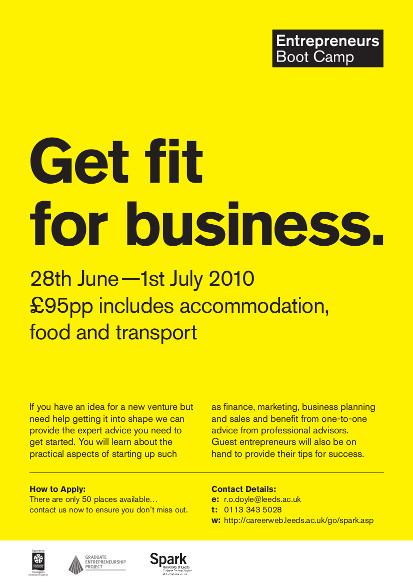
As a dedicated follower of the blog, you’ll know that I’ve just been back to school, at the Entrepreneur’s Boot Camp: to get a tight grip on the practicalities of things like tax, law and finance. I came away with a suitcase full of new knowledge, buckets of inspiration and a coach-load of new friends I’ve made along the way.
As a follow-up, the Graduate Entrepreneurship Project chose a few case studies from amongst the attendees at the event and my business was selected as one of them.
I’ve sort of had a taste of my own medicine. When I went freelance, part of my mission was to help people who don’t have time to tell the world about themselves because they’re too busy getting on with it.
Well here I am: getting on with it, solving that problem with copyriting and photography. But now I’m too busy to get to grips with all the practicalities of running a business: cash flow, tax and law to name but a few.
Necessary evils you might say or “worry about them later” you may also advise. Well, I think it’s only right that now this little snowball has begun its inexorable roll downhill that I get to grips with those subjects before this business manifests itself as a full blown avalanche.
A while back, I visited the helpful folks at the Leeds University Careers Centre or more specifically their ‘Spark’ entrepreneur project. I graduated from Leeds University some eight years previously and on a whim, decided to pop in and see if they could offer any tips for an experienced (old) alumni member like me.
They did more than that though, bringing the Entrepreneur’s Boot Camp to my attention: a four day residency where they hit each critical topic square on the head like some elaborate business-themed game of ‘whack-a-mole.’
So later this month I’ll be ‘going back to school,’ to swot-up on all the logistical essentials that most businesses probably take for granted. And by early July I’ll be armed with a whole new arsenal of weapons to compliment my smouldering creative ambitions.
Having the belief and determination is a topic for another blog post and I’ll cover that in due course, but suffice to say: just do it. There’s lots of support and resources out there. If you’re a graduate, I strongly recommend you get in touch with your old university career centre, even if you graduated a while back. The advice you’ll get will probably be more tailored and there’s always the possibility there might be funding available.
Hello, I'm a point and shoot camera, I live in your pocket. Photo by Kin0be
About six months ago I was asked to give a presentation on photography at an organisation I was working for at the time. As luck would have it, I’d taken part in some rigorous workshops on giving effective presentations so was all set to test my new skills in how to address an audience and hold their attention.
Briefly throwing aside everything I hold dear about copyriting punchy articles which get straight to the point, I’ll start by digressing. Don’t worry, we’ll get to the point and shoot camera tips right after I show you a simple technique to help you deliver good presentation:
Grab your audience’s attention to begin (I like to stay silent just long enough for it to be awkward or in the context of this article, I feigned dropping a camera for effect)
Tell them what they will learn from the presentation next
Present and explain a maximum of three ideas or concepts (this is the body of your presentation)
Summarise and recap what they (should hopefully) have learned at the end
Plan the presentation out first, using a whiteboard (or desk) divided into four sections (representing each of the above). Then write down each point you want to make on post it notes and shuffle them about between the sections until you’re happy.
Even with that fantastic technique, I still had to think long and hard about which aspect of photography to present, especially as it’s a subject you never stop learning. I sometimes even doubt my own abilities when I see the quality of photography coming out of Flickr explore. But to paraphrase the Strobist: if you’re constantly reaching just that one step further beyond yourself – that’s how you get better, isn’t it?
It didn’t take long for a presentation topic to germinate organically out of a few coincidental conversations with friends and colleagues when I mentioned the photography presentation. All were eager to prise open their bags revealing a plethora of point and shoot cameras amidst a throng of other devices and paraphernalia now required for modern life.
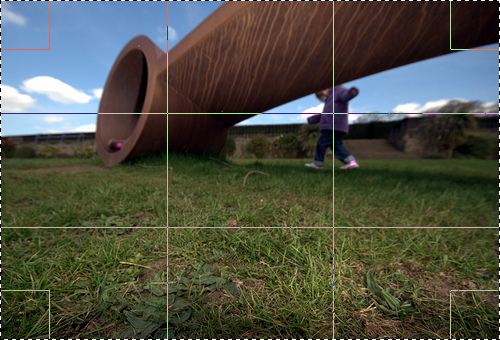
Rule of thirds: notice the how the top two intersections on the grid line up with the centre of points of interest in the photograph. Don't worry, this'll make sense in a moment.
“Would you like to know how to get a bit more out of that expensive camera you carry everywhere?” I suggested. The rest is history, so here’s the tips you were looking for:
Give your camera a head start: most point and shoot cameras now have a few ‘modes’ like ‘portrait’, ‘sport’ or ‘sunset.’ What these do is tell the camera to adjust a few settings based on the unique characteristics of that scene. For example in ‘sport’ mode it’ll concentrate on shutter speed to freeze the action, with ‘portrait’ it might increase the aperture to give more detail on the face or now know to focus on your subject’s eyes. Choose the right mode and rather than your point and shoot camera working in ‘one size fits all’ mode you’re giving it clues about the type of thing you’re pointing it at.
Compose, recompose: put a bit of thought into where objects, people or scenery will be in your shot. A good start is to use the ‘rule of thirds’ which says you should line up points of interest to a grid, using the camera’s viewfinder/screen.
Take more than one shot: your digital camera can hold thousands of photos, so five or six alternatives of the same shot from different angles won’t cost you anything. Shoot a few photos stood up, crouching, through something or move left and right a bit or zoom in and out. You can pick the best one later on, rather than realising the only photograph you took is blurred or cropped out Uncle Jack’s head. Plus you take more photos, you get better and you learn from your experience.
Finally, one extra tip for you: don’t leave those photos on a memory card. Photographs are meant to be seen, shared and enjoyed, not locked up in a binary dungeon. Plus, if your point and shoot camera gets lost, stolen or some moron drops it at a presentation if you’re sharing photographs in different places like Flickr, Picassaweb or Photobucket you’re effectively keeping back up copies elsewhere where they’ll be nice and safe.
With social media, it’s tempting to run straight out the front door with all guns blazing, pistol duelling with every site in the Wild West of social networking but neglecting to take care of the obvious things back home first: the humble web site.
Hands up, when I meet a new charity client I’ve been known to get a little too excited about all the great support services, case studies and community events they have ready for me to plug using social media. It’s very easy to start telling the world all about it, but without the collateral to back up the tweets and status updates your fans and followers are just going to walk into a content black hole.
That’s why, after I’ve taken a deep breath, I always suggest my clients invest a good amount of time in creating a reassuring body of content on their web site. This can take a while, to populate it with engaging copyriting and other media like photography and video, but it’s time well-spent. There’s also often an exercise to be done in improving usability and filling the cracks as this case study on Pizza Hut shows.
Blogs are perfect landing pads, so I tend to point social media back to articles where people can find out more about the story that’s been tweeted, also it gives my clients time to improve their main web site which all to often seems to be managed by some legacy content management system, in-house ‘technology enthusiast’ or is little more than a static brochure. If I had my way all the time, it wouldn’t be like that but ah well …
Remember. Social media is a powerful tool for getting your message out there and creating noise around your cause or brand. But it’s nothing without a web site full of fresh and interesting content to read that cements your values, solidifies recognition and converts a visitor to a donor or customer.
It’s easy to become overwhelmed with the different silos of information that we’ve begun distributing our lives across: email, RSS and social media to name but a few of the contenders in the battle for our attention. The problem is only accentuated with the proliferation of smart phones so now there’s no excuse for not staying in touch when you’re in transit or held hostage to bodily functions in the smallest room.
So I thought it’d be useful to share a few tools and tips that help me juggle my daily tasks in an age where if you hide from information … it’ll come and find you:
Bring the web to you. Any good web site (i.e. that produces fresh content on a regular basis) will offer an RSS/ATOM news feed – look out for the orange square icon next to the address bar in your web browser. Here’s my tip though: use a smart aggregator like Feedly that’ll organise all your different feeds, smarten them up and give you tools to manage featured posts and keep a record of what you’ve read. If you’re new to this, try Alltop as a way of finding RSS feeds relevant to your sector.
Instant messaging makes the web less lonely and lets you share knowledge, well, instantly. Bundle all of your messaging accounts into one place with Pidgin (or Empathy if you’re using Linux), soon you’ll have MSN, Google Talk, IRC and Facebook chat all in one place.
Nowhere is escape any more, not even the smallest room (photo by bitshaker)
Be disciplined about blogging. You should produce fresh regular content if you want to capture a readership and improve your search engine rankings. So if you’re not hiring me to do it for you, check out these excellent tips from the Social Media Examiner.
Get a to do list. Google Mail offers one built in, but it’s not quite fully-featured, so try Remember The Milk or Todoist instead.
Pull all your social networks into one place. Easy when you install TweetDeck – but don’t be confused by the name, it also covers Facebook, LinkedIn, Google Buzz and MySpace.
As you can see, these tools and tips are just clever ways of putting something in front of you and the relentless onslaught of information: effective filters if you will. And to quote a popular web 2.0 phrase: “It’s not information overload. It’s filter failure”- so choose better filters and make them work properly for you.